
A smooth classroom routine does not happen because students simply “know what to do.” In my experience, students do much better when the structure of the class is visible, predictable, and easy to follow from the moment they walk through the door. One of the simplest tools I use to create that structure is a daily agenda slide. It may look like a small classroom management strategy, but when it is used consistently, it can reduce repeated questions, make transitions easier, and help students become more independent throughout the lesson.
Daily agenda slides are especially useful because they give students a visual picture of what the class period will look like. Instead of asking, “What are we doing today?” or “What comes next?” students can look at the screen and see the plan for themselves. I like to keep the agenda projected whenever possible, especially at the beginning of class and during transitions. The goal is not to create a complicated presentation every day. In fact, the most effective slides are usually the simplest ones: a clear title, a short sequence of activities, and enough space for important reminders.
Start with a Consistent Opening Routine
The first few minutes of class often determine the tone for the rest of the period. When students enter the room, I want them to know exactly what they should do without waiting for verbal directions. A simple agenda slide can show the first task, the materials students need, and what they should begin working on immediately.
For example, a typical opening slide might include a “Do Now,” a reminder to take out a notebook, and a short list of the day’s activities. I usually keep the structure of this slide consistent from day to day. The content changes, but the layout stays familiar. That consistency matters because students gradually stop relying on the teacher for every instruction. They begin to recognize the routine and get started on their own.
This is especially helpful in upper elementary and middle school classrooms, where students are learning to manage materials, assignments, and transitions more independently. A visual routine gives them that independence without removing the structure they still need.
Keep the Daily Agenda Simple and Visible
An effective daily agenda does not need to include every detail of the lesson. I usually think of it as a roadmap rather than a lesson plan. Students only need enough information to understand the flow of the class.
A typical agenda might include four or five steps, such as a warm-up, mini lesson, partner activity, independent practice, and exit ticket. On another day, the agenda might be organized as “First, Next, Then, Finally.” For a longer class period, I may use a timed schedule so students can see how much time we plan to spend on each part of the lesson.
The key is readability. If students cannot read the slide from the back of the room, it is not doing its job. I prefer large headings, short phrases, high-contrast colors, and plenty of white space. I also avoid putting too much information on one slide. A classroom slide should help students understand the lesson more quickly, not give them another block of text to decode.
Use Agenda Slides to Make Transitions Easier
Transitions are one of the easiest places for a lesson to lose momentum. Even a simple change from teacher instruction to partner work can become noisy or confusing if students are not sure what they are supposed to do next.
This is where visual slides become particularly useful. Before a transition, I can display a slide showing the next activity, the expected voice level, the materials students need, and what they should do when they finish. Instead of giving the same directions several times, I can point students back to the screen.
For partner or group work, I might include headings such as “Your Task,” “You Will Need,” “Time,” and “When Finished.” For independent work, I might display a short checklist. These small visual supports make classroom routines clearer and also help students who need more processing time or who missed part of the verbal directions.
Over time, students begin checking the screen before asking a question. That small change can make the classroom feel much calmer.
Add Learning Targets Without Overloading the Slide
Learning targets can also fit naturally into daily classroom slides. I often like to show students both what we are doing and why we are doing it. A simple “Learning Target” or “Today We Will” section can make the lesson feel more purposeful.
However, I try not to turn the agenda slide into a wall of educational terminology. The target should be short enough that students can understand it quickly. If the learning objective needs more explanation, I would rather discuss it with students than place a long paragraph on the screen.
One useful layout is to place the agenda on one side and the learning target on the other. Another is to include the learning target at the top and three or four lesson steps underneath. The best layout depends on the class, but the important thing is that the information remains visually clear.
Use Timed Agenda Slides to Help Students Manage Work Time
Students often have a very different sense of time than teachers do. Ten minutes can feel like an entire class period to one student and about thirty seconds to another. Timed agenda slides can help make work periods more concrete.
For example, I might show that students have five minutes for a warm-up, ten minutes for instruction, twenty minutes for practice, and five minutes for an exit ticket. I do not always follow the schedule perfectly, because teaching rarely works that way, but the visual time blocks give students a general sense of pacing.
Timed slides can also reduce questions such as “How much time do we have?” or “Are we almost finished?” When students can see the plan, they have more information to manage their own work.
For classes that need more flexibility, I sometimes use a simpler structure with labels such as “Beginning,” “Middle,” and “End” instead of exact times. The goal is not to turn every lesson into a rigid schedule. The goal is to make the lesson flow visible.
Try a Must Do / May Do Slide for Independent Work
One of my favorite classroom slide formats is the “Must Do / May Do” layout. This works especially well on independent work days, catch-up days, review days, or whenever students are working at different speeds.
The “Must Do” section shows the tasks every student needs to complete. The “May Do” section gives students productive choices if they finish early. This immediately answers two common classroom questions: “What do I have to finish?” and “What should I do when I’m done?”
For students who need additional structure, I sometimes use “Must Do / Should Do / Could Do.” This creates a clear priority system without requiring me to explain the order of tasks individually to every student.
Slides like these are also useful for substitute days because the expectations remain visible even when the regular teacher is not in the room.
Use a Catch-Up Day Slide When Students Need Flexibility
Not every class period follows the usual lesson structure. Some days are for finishing missing work, completing projects, preparing for assessments, or catching up after an interruption. On those days, a traditional agenda may not be the best fit.
A catch-up day slide can divide tasks into categories such as “Start Here,” “Then,” “If You Finish,” and “Before You Leave.” I like this format because it still provides structure while allowing students to work on different assignments.
It is also a good way to prevent catch-up days from turning into unstructured free time. Students can clearly see that there is still a plan, even if everyone is not completing the exact same activity.
End the Class with a Visible Wrap-Up Routine
Daily slides are useful at the end of class too. A simple final slide can remind students to complete an exit ticket, submit an assignment, put materials away, check their area, and wait for dismissal.
This may seem basic, but end-of-class routines can become chaotic very quickly, especially when students start packing up early. A visible wrap-up slide gives the class a shared routine and allows me to redirect students without stopping everything to repeat the directions.
You can also include a reminder about homework, an upcoming quiz, or what students need to bring to the next class. Keeping these reminders visible for the final few minutes increases the chance that students will actually notice them.
You Do Not Need to Design a New Slide Every Day
One mistake teachers sometimes make is assuming daily slides have to be completely redesigned every morning. That quickly turns a time-saving tool into another planning task.
I recommend creating a small collection of reusable layouts instead. You might have one simple agenda, one timed agenda, one learning target layout, one checklist, one “Must Do / May Do” slide, one catch-up day slide, and one end-of-class slide. Once students are familiar with the layouts, you only need to change the text.
I also like having several visual variations of the same type of slide because different lessons need different structures. A three-step agenda works well for a short lesson, while a six-step agenda may be better for a longer class. Some days need a homework section, while others need an essential question or materials list.
The important thing is that the design supports the routine instead of creating more work for the teacher.
A Simple Daily Slide Routine to Try
If you are just starting with classroom slides, you do not need to project a different slide every five minutes. Start with a simple sequence.
When students arrive, display a daily agenda with the first task. During instruction, switch to a learning target or lesson flow slide if needed. Before independent or group work, display the directions and time expectations. At the end of class, show the wrap-up or homework slide.
That alone can create a noticeable difference in how smoothly students move through the lesson.
Once the routine is established, you can add other slide types such as timed schedules, priority lists, catch-up day templates, essential questions, or classroom reminders.
Ready-to-Use Editable Daily Agenda Slides
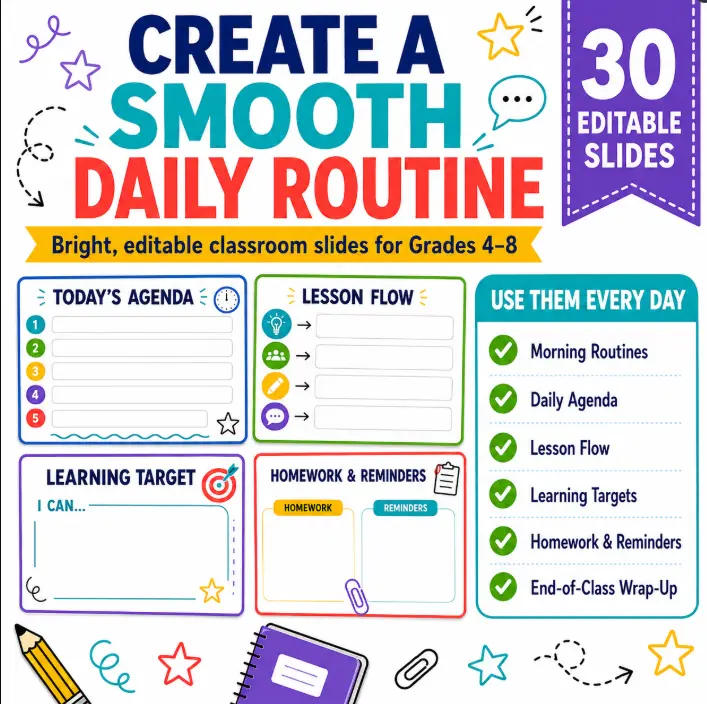
If you would rather start with a complete set of layouts instead of designing everything from scratch, I created a collection of 30 Editable Daily Agenda Slides for Grades 4–8. The set includes traditional daily agendas, lesson flow templates, timed class plans, learning targets, Must Do / May Do slides, priority task layouts, homework and reminder slides, catch-up day templates, and flexible blank layouts.
The slides are designed with bright, high-contrast colors and large readable spaces so they can be projected clearly in the classroom. You can simply add your own lesson information, duplicate the layouts you use most often, and reuse them throughout the school year.
You can view the Editable Daily Agenda Slides here:
A good classroom routine does not need to be complicated. Often, the biggest improvement comes from making expectations more visible and predictable. When students can walk into class, look at the screen, and immediately understand what is happening, both teaching and learning become a little easier.
